Manage production efficiently (and electronically) in one system
Syncore Production Tools & Core 360 Playbooks help your teams schedule, execute, and analyze operations electronically in the same system as all your other teams.
- Easily schedule operators & equipment
- See real-time status updates & notes across teams
- Identify trends in operational performance & spoilage
Syncore Production Tools
Production Worksheet
Production Scheduler
Printable Packing Slips
Receiving Memos
Spoilage Analysis
Advanced Reporting
Team Visibility & Communication
The problem
Can you see how your production operations are really doing?
We often see distributors rely on paper and in-person interaction, limiting their ability to work and collaborate efficiently, follow scalable SOPs, and make strategic operational decisions.
Manually walking notes over to the production line
Important details get lost, it’s difficult to stay organized, & everyone has to be in person
Production disconnected from SOs, POs, & CSRs
Quantities, colors, & other details don’t line up & it’s difficult to communicate quickly
Little visibility into operational performance
You have no idea how individual operators perform or if your equipment is serving you well
Syncore Production Tools
Your 360° Promo Platform for organized production management
Syncore gives production teams the tools, visibility and Core 360 SOPs they need in Syncore to schedule, execute, and analyze operations proactively.
How Production Teams Execute Efficiently with Syncore
Manage Production in One System
Keep it all in the same system
CSRs can start the production workflow in the same system as your SOs & POs, so you don’t have to start from scratch.
Printable Packing Slips
Generate packing slips that are easy to print right from the Sales Order, so they show accurate order details
Receiving Memos
Create receiving memos from the Purchase Order to indicate partials or full quantities were received
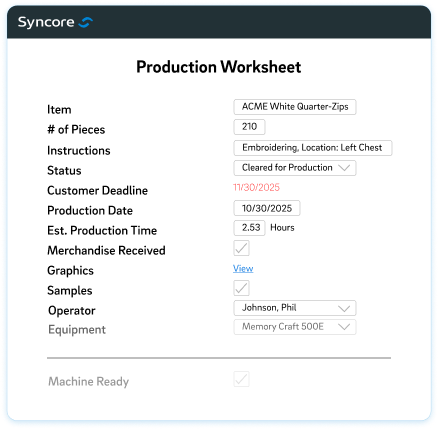
Production Worksheet
Use a template to assign operators & equipment & effectively communicate key details like instructions, dates, & locations
Efficient Operations & Collaboration
Execute & collaborate in real-time, electronically
No more hand-delivered stacks of paper – keep track of everything in progress and adjust as needed.
Production Scheduler
Get a detailed view of job status, operator, equipment, time estimates, & more as well as what information operators are still need
Operator & Equipment Summaries
Quickly reference the capacity of operators & equipment so jobs are well-distributed
Job Tracker
Give CSRs & production teams an easy way to communicate if there are delays or if new pieces need to be ordered due to spoilage
360° Strategic View
Know exactly how your team & equipment are performing
Syncore’s detailed reports give production managers a way to make operational decisions with data.
Spoilage Analysis
Account for damaged product & filter by operator or equipment to identify patterns
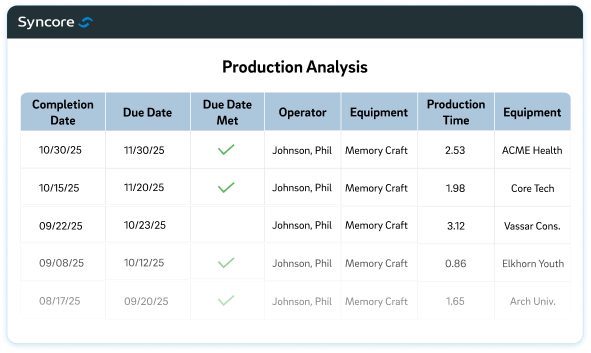
Production Analysis
Quickly evaluate operator or equipment performance by seeing accuracy, hours completed, & more
Daily Summaries
See jobs completed (or not completed) each day to ensure orders are on schedule
Why distributors love Syncore’s
production management tools
Core 360 Playbooks
Production teams use Core 360 Playbooks to stay proactive & efficient
When production is busy, it’s critical that every operator knows their marching orders.
Our Core 360 Playbooks help production teams stay organized, work proactively, and easily tick all the boxes of pre-made daily, weekly, and monthly checklists that ensure they’re completing assigned jobs effectively and on-time.
Frequently Asked Questions
Which tools does Syncore have for production?
Syncore has great production solutions for promo distributors who do in-house decoration. You can create packing slips, receiving memos, and production worksheets to assign operators and equipment right from the Purchase Order. The Production Scheduler gives you a clear view of production jobs in progress, statuses, outstanding information needed, and operator and equipment summaries so you always have a pulse on what’s in progress and what your team’s capacity is. The Job Tracker provides a level of cross-team visibility, allowing production teams to communicate quickly with CSRs and other team members to ask questions and resolve issues quickly. We also provide several advanced reports like Spoilage Analysis, Production Analysis, Daily Summaries, and more so you can make data-driven decisions around your operational strategy. Because production is part of Syncore, you have the electronic, efficient processes in place to maximize your production operations.
Why do I need electronic production instead of paper processes?
Relying on stacks of paper with order details mean jobs can (literally) get lost or become outdated – and everyone has to be in person to communicate. Electronic production tools help your teams stay organized and accountable. And since production lives in Syncore, production jobs come from the same system as POs and carry over the exact details production teams need to get the order right. Job statuses and notes can be shared easily among CSRs and production managers to ensure jobs are moving along appropriately and issues can be resolved quickly if needed. You’ll have data through advanced reports that can give you a clear view of operational performance and help you make informed decisions. These processes are near impossible to do efficiently with paper alone – Syncore makes efficient production operations a reality.
What production-related reporting is available?
With Syncore’s production reports, know exactly how your team and equipment are performing on a regular basis and make operational decisions with data. The Spoilage Analysis report accounts for damaged product, allowing you to filter by operator or equipment to identify patterns and course correct. The Production Analysis report helps you quickly evaluate operator or equipment performance by seeing accuracy, hours completed, and more. For a more frequent view, the Daily and Non-Completed Summaries allow you to see jobs completed (or not completed) each day to ensure orders are on schedule. With production managed in Syncore, get a true 360° strategic view of your operations.
Does Syncore offer full visibility across the entire production workflow, including graphic artists, production operators, managers, and CSRs?
Yes! Your team can see the status of jobs, leave comments, and communicate to resolve issues through Syncore’s Job Log, tying in all the right stakeholders and updated job information. This is a key benefit of managing production in the same system as the rest of your order processing.
How does Syncore handle receiving-related documentation, such as receiving memos or packing slips?
Creating documentation like receiving memos or packing slips in Syncore is easy. You can generate them right from the Purchase Order with a click – no copying and pasting information into another system required.
Does Syncore integrate with other production systems?
Yes, you can integrate with any existing production software you have with the Syncore Connect API. Plus, we have a prebuilt Shopworks integration in progress. View our Syncore Connect page to learn more.
What are Core 360 Playbooks and how do they help my production team?
Core 360 Playbooks help production teams stay organized, work proactively, and easily tick all the boxes of pre-made daily, weekly, and monthly checklists that ensure they’re completing assigned jobs effectively and on-time. These tried-and-true SOPs help production teams know exactly what they need to do and collaborate with ease.
Does Syncore provide filtering capabilities within the Production Scheduler?
Yes – to help you find what you’re looking for fast, you can filter by decoration type, status, operator, equipment, and a selected date range.